

Description
You experience that your Windows 11 crashes when running the analyzer software installer (msb-VERSION-windows.installer.exe). The same may happen when you (after an apparently successful installation) start the program by double-click the desktop program icon or executing the msb_serv.exe directly. We don't have any reports with older Windows or Linux systems.
Solution
This error occurs only very rarely and is seemingly caused by the Windows anti-virus protection mechanism. To get the analyzer software installed without any problems (or starting the software afterwards) open the Windows settings and click the 'Virus & threat protection' tab on the left side, see picture below:
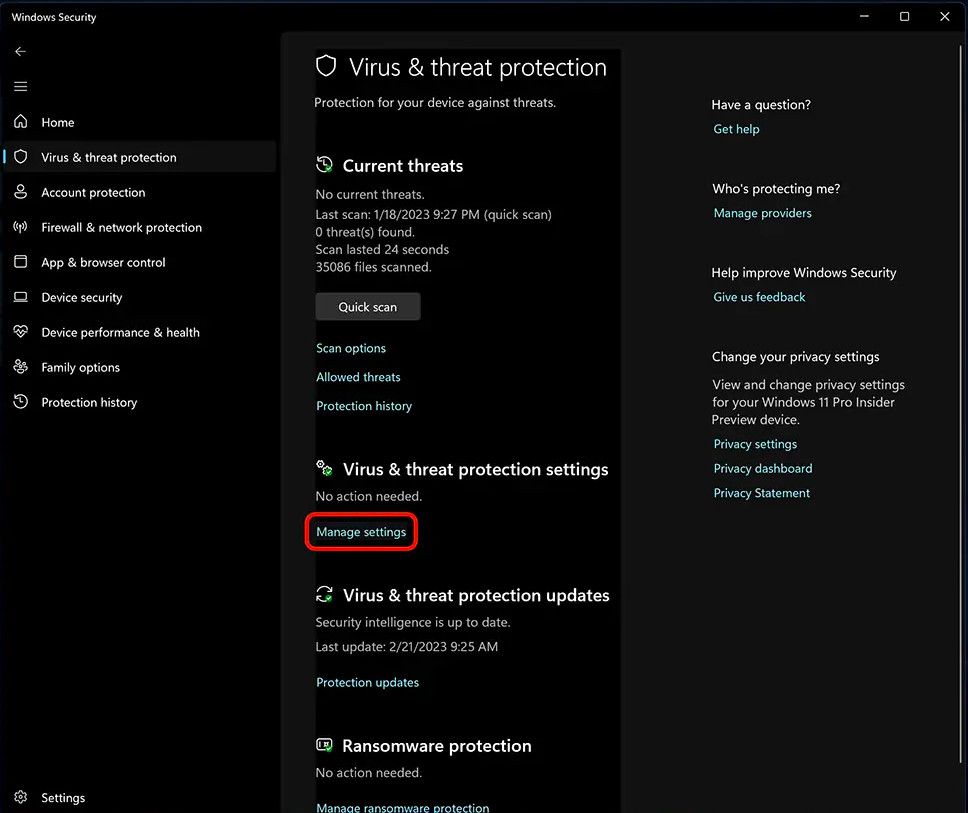
In the 'Virus & threat protection settings' click the link 'Manage settings' (red marked). There switch off the 'Real-time protection'. Windows will turn this switch on again after a short time automatically, but in the meantime you can install the analyzer software without any issues.
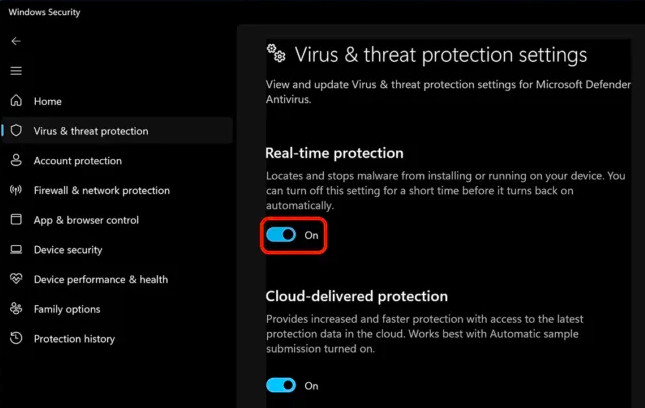
This bug is rarely reported by our customers and when, disable the real-time protection for a short time solved the problem. Once installed the problem didn't occur anymore.
If the solution doesn't work for you, or the crash happens again later, please send us an email to support@iftools.com