

Description
You have correctly connected a MSB PLUS analyxzer (MSB-RS232-PLUS or MSB-RS485-PLUS) with your system and the status LED lights up blue. After starting the software, the startup dialog reports an error (MSB not found). Note! This only applies to the PLUS analyzer series and Linux.
Solution
Beginning with version 5.0 the analyzer access via a virtual serial port was replaced by a direct USB access (FTDI d2xx). This change highly increases the data transfer rate and is mandatory for the newest analyzer generation (PLUS types).
Unfortunately both kinds of device accesses are mutually exclusive, which means: You cannot perform a direct USB access via FTDI d2xx if the device is registered to the kernel as virtual serial port (/dev/ttyUSBx). An proper udev rule is needed to exclude an analyzer device from this registration as soon as the kernel detects it. Normally the rule is installed during the software installation and you can check it with:
ls -l /etc/udev/rules.d
In a Linux system with a working analyzer you will see something like this:
-rw-r--r-- 1 root root 262    Jan 12 14:23  10-iftools-msb.rules
-rw-r--r-- 1 root root 620    Feb 23 2016   70-persistent-net.rules
-rw-r--r-- 1 root root 58549  Jan 17 2019   70-snap.core.rules
-rw-r--r-- 1 root root 984    Mar 4 16:10   70-snap.telegram-desktop.rules
Important is the file 10-iftools-msb.rules. If it does not exist Linux cannot find your analyzer. To fix it open a terminal and cd (change working directory) to the installation directory of your analyzer software.
cd ~/msb-VERSION
sudo ./udev-install.sh
A correct udev rule for the IFTOOLS analyzers looks like:
# 10-iftools-msbc.rules
#
# Apply the new rules with: sudo udevadm trigger
ATTRS{idVendor}=="0403",
ATTRS{idProduct}=="6001|6014",
ATTRS{manufacturer}=="IFTOOLS",
MODE="0660",
GROUP="dialout",
RUN+="/bin/sh -c 'echo -n %k:1.0 > /sys/bus/usb/drivers/ftdi_sio/unbind'"
This rule is applied to all USB devices with a FTDI chip (vendor ID 0403) and a certain chip type used in the analyzers (Product ID 6001 or 6014). To make sure, that no other devices with the same chip configurations are affected, the rule checks the manufacturer (IFTOOLS) too.
You can test the correct operation of the rule by open a terminal, then (re)connect your analyzer and input:
sudo dmesg
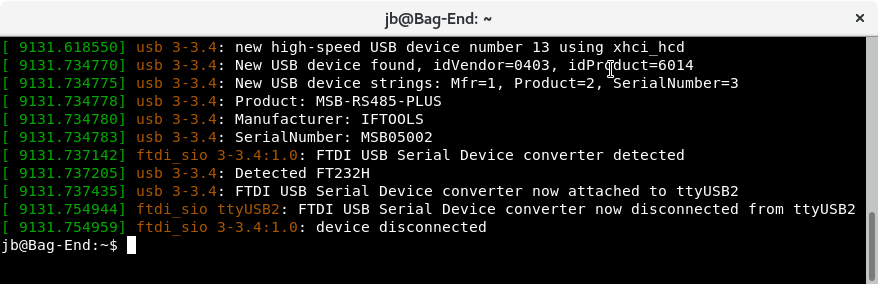
Here the kernel detects a new USB device (as an example our MSB-RS485-PLUS) and disconnected it from ttyUSB2 so it is free for the direct d2xx access.
We discuss this in the manual too, see chapter 'Linux Trouble-Shooting'.