

Windows 64 Bit. When you start the analyzer program the application detects two identical analyzer devices connected with the same COM port as shown here:
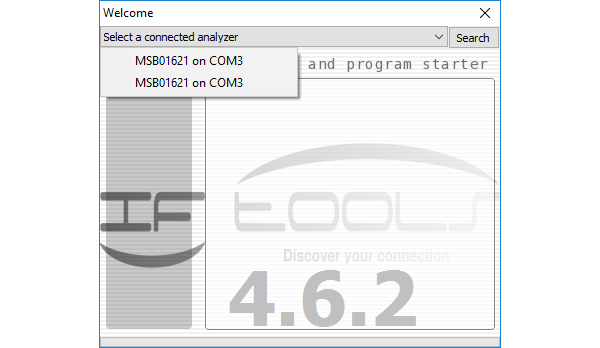
The program works correct after selecting one of the listed items, nevertheless showing an identical analyzer twice is a serious hint that something is wrong with your driver installation.
If you did not already removed the according FTDI driver and reinstalled it again, try this first. We recommend to use the FTDI Clean Utility. You will find it on our download page too, just input "FTClean" in the search field.
If the issue remains, it is most probably caused by a parallel installed 32 bit AND 64 bit Windows FTDI driver.
Solution
Remove all FTDI .sys and .dll files in C:windowssystem32 and C:windowssysWOW64. (Running the uninstaller only isn't enough). These are:
- C:windowssystem32ftbusui.dll
- C:windowssystem32ftcserco.dll
- C:windowssystem32ftd2xx.dll
- C:windowssystem32FTLang.dll
- C:windowssystem32ftserui2.dll
- C:windowssystem32driversftdibus.sys
- C:windowssystem32driversftser2k.sys
- C:windowsSysWOW64ftd2xx.dll
First disconnect all devices which are using a FTDI driver (e.g. the analyzer, one of our USB to serial converter or other devices). Please take care that you only remove the listed files. We recommend you to clear your desktop recycle bin before starting to delete these files and remove them to the recycle bin. This give you the chance to restore the files if something goes wrong. Also note that you need admin rights to do this.
After removing/deleting the files reboot your system and make a clean driver installation again. You will find the newest drivers in the driver section of our download page.
If the issue remains, please start the analyzer application from within a command window with:
- Right click the start button or press WIN+X again
- Choose 'Command prompt'
Input:
msb_serv --verbose
The --verbose argument forces the application to log the whole analyzer device detection into the file AnalyzerScan.txt on your desktop. Again select one of the double listed analyzer devices in the start dialog to launch the analyzer program. Then send this file to support@iftools.com.