

Introduction
The analyzer Software covers the most common CRC algorithms and provides an appropriate checksum function in native code for best performance. Nevertheless there is always a chance that your analysed protocol uses e.g. an individual CRC16 which is not part of the integrated Lua checksum module. This article will show you, how you implement every CRC16 validator in a protocol template via Lua. (It may also serve as an example for CRC algorithms with a different bit width). All you have to know are the CRC parameters used by your CRC checksum.
Determine the CRC16 parameters
The following parameters must be known:
- Width - the number of bits for the result (here 16 bit)
- ReflectIn (boolean) - Whether to reverse the input bytes before applying the algorithm to them
- XorIn - the initial value of the CRC register.
- Polynom - the polynomial being used to generate the CRC
- ReflectOut (boolean) - whether to reverse the bits of the CRC before presenting it as the final result.
- XorOut - a value to be exclusive-ored with the final CRC value.
As you can see there are a lot of possible combinations. Luckily there is a nice CRC online calculator which calculates the checksum of a given data sequence for all combinations automatically. You only need one or better several data sequences you can use for feeding the calculator and to compare the result with the checksum in your own transmission.
Extract sample data sequences from your telegrams
At this time you should at least know how telegrams in your transmission are separated from each other. For instance in Modbus RTU the telegrams are divided by a specified idle time of 3.5 bytes (the time it needs to transmit 3.5 bytes). In the Protocol View the out() function output all telegrams as a sequence of hex bytes. You can simply do it with the following code snippet.
function out()
   -- the current telegram
   local tg = telegrams.this()
   -- display all data except for the
   -- last two bytes as 8 bit values
   box.text{
      caption="Data",
      text=tg:dump {
         width=2,
         first=1,
         last=-3
      }
   }
   -- the last 2 bytes represent the
   -- checksum, shwon as two 8 bytes
   box.text{
      caption="CRC16",
      text=tg:dump{
         width=2,
         first=-2,
         last=-1
      }
   }
end
The code above displays the whole content of each telegram as two fields. The data field contains all telegram bytes except for the last two CRC16 bytes. The checksum field shows the telegram checksum. Here is a screen shot:
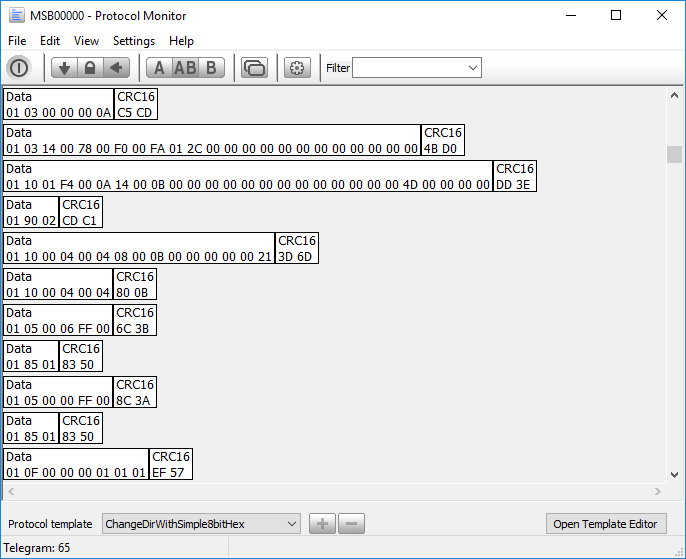
Since we are looking for a CRC16 algorithm the last 2 bytes represent the CRC16 checksum. For instance the very first telegram has the checksum C5CD, the checksum of the second one is 4BD0. Most checksums are calculated by the whole telegram data - of course except for the checksum bytes at the end. But be aware that your protocol may handle checksums a little bit different.
The online checksum calculator
Now it's time to visit this nice Online CRC Calculator as mentioned before. All you have to do is to input an according data sequence of your record and check if some of the displayed checksum results (column Result) matches your telegram checksum. You can do it manually but there is a nice trick which let you easily copy and paste every chosen telegram into the input field of the online calculator. It will spare you some time and it is less error prone than input every byte manually!
The online calculator expects the input data either as ASCII or Hex. We will use the Hex mode since it handles binary data far better. All we need is some output of every (selected) telegram as a hex string like 01030000000AC5CD.
The Protocol View provides you with a special debug output. Mainly intended for helping debug your templates (as the name suggested) it can also be used to produce any text output in the debug log window. And from there you can simply copy and paste it or even save it into a file.
How to add a debug output? Just add the code below before the end of the out() function.
debug.print(
   tg:dump{
      width=2,
      sep=""
   }
)
The function print() of the debug module outputs any Lua string or number. Here we pass a data dump of the current telegram (like we display the data in the telegram window via the box module). We only suppress the default space as separator to get a single hex string without any space characters.
Apply the new code with F5 in the Protocol editor, then press STRG+ALT+O to open the Lua debug output window. Now you can simply select the telegram bytes from the output window and paste it into the online calculator input field. Remember, that the last two bytes are the CRC16 checksum and must not copy and pasted with the rest of the telegram.
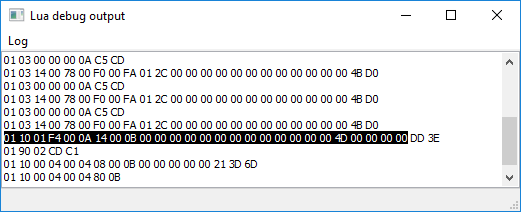
Since the telegram data is displayed as hex set the input type to hex. Then click Calc CRC-16 to calculate the several checksums.
Instead of vary all different CRC parameters by yourself (an exhausting and bothering job) the Online CRC Calculator outputs the checksum for any meanful combination (algorithm). It's up to you, to look for a matching checksum. Just note that the checksum results may occur reverse. This depends on your protocol and how 16 bit values are transmitted. Either with the low or high byte first.
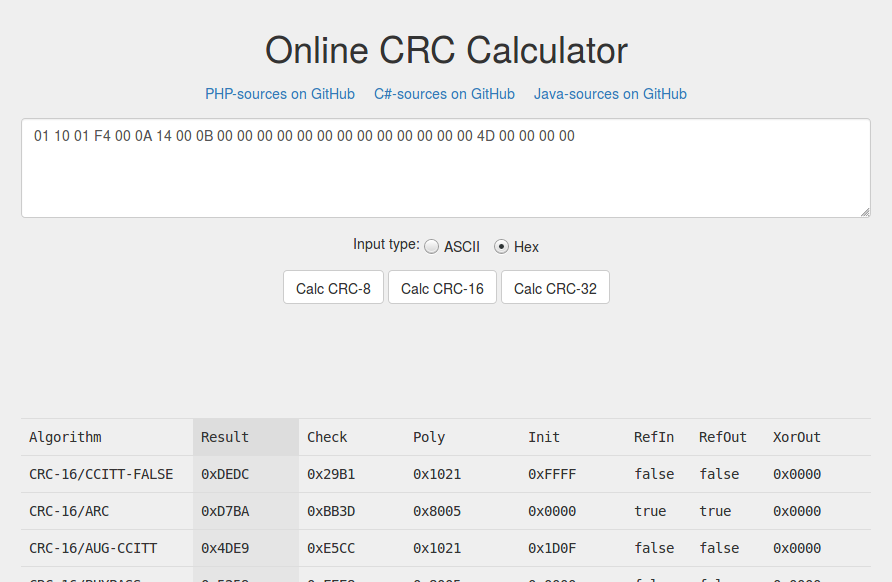
As soon as one of the displayed checksum result is equal to the checksum bytes in the according telegram you have at least a first trace. To be sure repeat the CRC calculation with a few different telegrams. Note the parameters (Poly, Init, RefIn, RefOut, XorOut) of the found checksums. They have to be always the same! If your are sure about the required CRC parameters you can proceed with the next step. Replicate the CRC mechanism in pure Lua.
In our example we are looking for the checksum DD3E (or 3EDD in a reverse byte order). The calculator issues 3EDD as a Modbus RTU CRC16 which matches our checksum just in another byte order. Since there is no other DD3E the Modbus RTU algorithm looks like the correct one. Nevertheless repeat it with other telegram data until you are sure, that the checksum is always the same (maybe only with a different byte order).
Write the CRC checksum algorithm in Lua
At this point you know the necessary parameters of your CRC16 algorithm. In our example we found these parameters:
- Polynom: 0x8005
- Init value: 0xFFFF
- ReflectIn: true
- ReflectOut: true
- XorOut: 0x0000
In the following we will use a table driven generator for the checksum calculation because it is a lot faster and easier to implement. The whole algorithm uses a Initial CRC value, the polynom, and the final XorOut value. Additional the algorithm must take care about the ReflectIn and ReflectOut settings (RefIn and RefOut in the resulting table of the calculator).
Generate the table
There are several solutions available. We recommend this Online Javascript CRC table generator which not only calculates CRC checksums but also creates the needed table for you. And this without to install any additional tool or program on your computer. All you have to do is to choose the CRC width (8, 16, 32 bit), select custom CRC parametrization, and input the values for the polynom, initial and final xor value as found out before. Don't miss the switches for the input reflected (ReflectIn or RefIn) and output reflected (ReflectOut or RefOut). According to our example input:
- CRC width: 16
- CRC parametrization: Custom
- Input reflected: yes
- Result reflected: yes
- Polynomial: 0x8005
- Initial value: 0xFFFF
- Final Xor value: 0x0000
- CRC Input Data: Bytes
- Input Data: 01030000000A
Then click the button 'Calculate CRC!'
You should get the same checksum result as in our very first telegram CDC5 or C5CD (according to the byte order as mentioned before). The last step is to copy the CRC16 table for our Lua checksum implementation.
Now open your Protocol View template editor and insert the following Lua crc16 template code:
local crcTable = {
   -- copy and paste the NOT reflected table here...
}

local crcTableReflected = {
   -- copy and paste the reflected table here...
}
function crc16( data, xorIn, refIn, refOut, xorOut )

   function reflect( data, width )
      local ret = data & 1
      for i=2, width do
         data = data >> 1
         ret = ( ret << 1 ) ~ ( data & 1 )
      end
      return ret & 0xFFFF
   end

   local crc = 0
   if refIn then
      crc = reflect( xorIn, 16 )
      tbl = crcTableReflected
      for i=1, #data do
         local index = ( ( crc ~ data:byte(i) ) & 0xFF ) + 1
         crc = ( tbl[index] ~ ( crc >> 8 ) ) & 0xFFFF
      end
   else
      -- OK
      crc = xorIn
      tbl = crcTable
      for i=1, #data do
         local index = ( ( crc >> 8 ~ data:byte(i) ) & 0xFF ) + 1
         crc = ( tbl[index] ~ ( crc << 8 ) ) & 0xFFFF
      end
   end
   crc = crc & 0xffff
   -- Reflect the result when ONE of refIn or refOut is true
   -- NOTE! Do not reflect the result when BOTH are set!
   if (refIn == true and refOut == false ) or
   ( refIn == false and refOut == true ) then
      crc = reflect( crc, 16 )
   end
   return crc ~ xorOut
end
In a last step replace the spaces between the copied hex values with a comma. Otherwise Lua will give you an error.
crcTable = {
   -- put the copied values here...
   -- Note the comma between every
   -- value
   0x0000,0x8005,0x800F,0x000A,...
}
That's all! The inserted Lua crc16 template code provides you already with a checksum function which will take care of the rest. The checksum function crc16 is called as:
crc16(data, xorIn, refIn, refOut, xorOut)Back to our example you can easily calculate the CRC16 checksum for every telegram with:
chksum = crc16(
   tg:string():sub(1,-3),
   0xFFFF, true, true, 0
)
tg:string():sub(1,-3) returns all telegram bytes except for the last two (which represent the checksum). 0xFFFF is the initial XOR value, input and output value are both reflected (true). The result is XORed with 0 (no xor).
Afterwards you can compare the calculated checksum with the last two bytes of the telegram and show the result as a valid checksum (e.g. in green) or an invalid checksum in a red box.
In case you cannot find the right parameter of your CRC16 or need some help with this issue, just drop us a note via support@iftools.com.