

Description
Your analyzer was connected correctly with your system. On older analyzers both red state LEDs are on. On newer analyzers (PLUS series) the status LED lights up blue.After starting the software, the startup dialog reports an error (MSB not found) - which simply means that Linux cannot find your analyzer. The reasons differ depending on the analyzer (old or new PLUS series). In the following we show you how to fix the problem - first for the PLUS serie, next for the older analyzers.
MSB-RS232/RS485-PLUS
Check udev rule
Beginning with version 5.0 the analyzer access via a virtual serial port was replaced by a direct USB access (FTDI d2xx). This change highly increases the data transfer rate and is mandatory for the newest analyzer generation (PLUS types).
Unfortunately both kinds of device accesses are mutually exclusive, which means: You cannot perform a direct USB access via FTDI d2xx if the device is registered to the kernel as virtual serial port (/dev/ttyUSBx). An proper udev rule is needed to exclude an analyzer device from this registration as soon as the kernel detects it. Normally the rule is installed during the software installation and you can check it with:
ls -l /etc/udev/rules.d
In a Linux system with a working analyzer you will see something like this:
-rw-r--r-- 1 root root 262    Jan 12 14:23  10-iftools-msb.rules
-rw-r--r-- 1 root root 620    Feb 23 2016   70-persistent-net.rules
-rw-r--r-- 1 root root 58549  Jan 17 2019   70-snap.core.rules
-rw-r--r-- 1 root root 984    Mar 4 16:10   70-snap.telegram-desktop.rules
Important is the file 10-iftools-msb.rules. If it does not exist Linux cannot find your analyzer. To fix it open a terminal and cd (change working directory) to the installation directory of your analyzer software.
cd ~/msb-VERSION
sudo ./udev-install.sh
A correct udev rule for the IFTOOLS analyzers looks like:
# 10-iftools-msbc.rules
#
# Apply the new rules with: sudo udevadm trigger
ATTRS{idVendor}=="0403",
ATTRS{idProduct}=="6001|6014",
ATTRS{manufacturer}=="IFTOOLS",
MODE="0660",
GROUP="dialout",
RUN+="/bin/sh -c 'echo -n %k:1.0 > /sys/bus/usb/drivers/ftdi_sio/unbind'"
This rule is applied to all USB devices with a FTDI chip (vendor ID 0403) and a certain chip type used in the analyzers (Product ID 6001 or 6014). To make sure, that no other devices with the same chip configurations are affected, the rule checks the manufacturer (IFTOOLS) too.
You can test the correct operation of the rule by open a terminal, then (re)connect your analyzer and input:
sudo dmesg
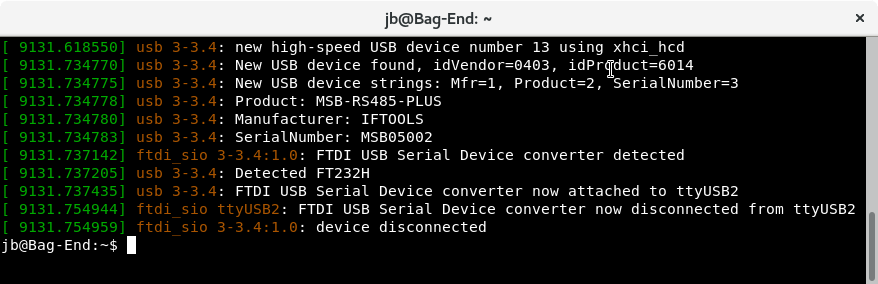
Here the kernel detects a new USB device (as an example our MSB-RS485-PLUS) and disconnected it from ttyUSB2 so it is free for the direct d2xx access. We discuss this in the manual too, see chapter 'Linux Trouble-Shooting'.
MSB-RS232/RS485
Check your permissions
Linux handles an old analyzer as a serial USB device like /dev/ttyUSB0 and you need read/write permissions to access the device. Except for root only members of the group dialout (Debian based systems, newer OpenSUSE) or uucp (SuSE) can do this. Open a terminal (with an connected analyzer) and type:
ls -l /dev/ttyUSB*
You will get something similar like this:
crw-rw---- 1 root dialout 188, 0 2009-08-26 14:47 /dev/ttyUSB0
crw-rw---- 1 root dialout 188, 0 2009-08-26 14:47 /dev/ttyUSB1
...
If there is no /dev/ttyUSBx device listened the udev rule add by the analyzer software installer already skips the detection as a virtual serial port (to operate the analyzer via a USB direct access). In this case please just go ahead with the next step.
Check your group memberships by input the command:
groups
The following result indicates, that you are member of your own group (YOUR_USER_NAME), the groups cdrom, floppy, audio, video and plugdev. But your are not member of the required group dialout (or uucp) which you need to access the analyzer device.
YOUR_USER_NAME cdrom floppy audio video plugdev
To add yourself to the group dialout you must execute the following command via sudo. (In case you have not sudo rights, ask your system administrator).
sudo adduser YOUR_USER_NAME dialout
Please note! You have to logout and new login first until the changes are available. A reboot is not necessary.
Check for an installed Braille driver
You have the correct permissions for accessing the /dev/ttyUSBx device. Anyhow the analyzer wasn’t detected by the software. Be sure, that you don’t have an installed Braille driver. Disconnect and connect the analyzer again. Open a console and input dmesg. If the output displays something like this:
Detected FT232BM Feb 11 16:14:59 sd kernel: [ 1575.765756] usb 3-2:
FTDI USB Serial Device converter now attached to ttyUSB0 Feb 11
16:14:59 sd kernel: [ 1575.881392] usb 3-2: usbfs: interface 0 claimed
by ftdi_sio while ’brltty’ sets config Feb 11 16:14:59 sd kernel: [
1575.885485] ftdi_sio ttyUSB0: FTDI USB Serial Device converter now
disconnected from ttyUSB0
a Braille driver is part of your system. If you have no need for a Braille device, please remove it from your system. On Debian based systems a:
sudo apt-get remove brltty
should work.
Both solutions don't work
Please help us with conflicting devices.
The firmware loader uses the information which is collected in the USB enumeration procedure to detect all serial ports connected to a MSB-analyzer. Because of the manifold combinations of existing USB devices and drivers we can not exclude the possibility that in rare cases the program does not detect the analyzer correctly. To regard these situations in the further program development we need your active help.
Open a command shell (terminal) again and change to the installation directory.
Enter the following command:
./msb_serv --verbose
The --verbose parameter forces the program to store the report file AnalyzerScan.txt with information concerning the internal analyzer detection on your desktop. It is a plain ASCII text file and you can open it with any editor. Just send this file afterwards to support@iftools.com.